Weekly Routine
You will receive a copy of a weekly planner that clearly shows the days the girls need to wear sports uniform, or have specialist lessons that require things like sports bags or library bags to be brought to school.

2026
| Term 1 | |
|---|---|
| Friday 23 January 2026 | New Students to Senior School & Year 7 Orientation |
| Tuesday 27 January 2026 | All Students Commence Term 1 |
| Thursday 2 April 2026 | Last Day of Term 1 |
| Term 2 | |
|---|---|
| Tuesday 21 April 2026 | All Students Commence Term 2 |
| Friday 26 June 2026 | Last Day of Term 2 |
| Term 3 | |
|---|---|
| Tuesday 21 July 2026 | All Students Commence Term 3 |
| Friday 25 September 2026 | Last Day of Term 3 |
| Term 4 | |
|---|---|
| Tuesday 13 October 2026 | All Students Commence Term 4 |
| Wednesday 9 December 2026 | Last Day of Term 4 + Speech Night |
| Term 1 | |
|---|---|
| Friday 29 January 2027 | New Senior School students and Year 7 Orientation |
| Monday 1 February 2027 | All Students Commence Term 1 |
| Friday 9 April 2027 | Last Day of Term 1 |
| Term 2 | |
|---|---|
| Wednesday 28 April 2027 | All Students Commence Term 2 |
| Friday 25 June 2027 | Last Day of Term 2 |
| Term 3 | |
|---|---|
| Tuesday 20 July 2027 | All Students Commence Term 3 |
| Friday 24 September 2027 | Last Day of Term 3 |
| Term 4 | |
|---|---|
| Tuesday 12 October 2027 | All Students Commence Term 4 |
| Wednesday 8 December 2027 | Last Day of Term 4 and Speech Night |
Weekly Routine
You will receive a copy of a weekly planner that clearly shows the days the girls need to wear sports uniform, or have specialist lessons that require things like sports bags or library bags to be brought to school.
| Period | Times | Friday Details |
|---|---|---|
| 1 | 8:50am - 9:10am | |
| 2 | 9:10am - 9:50am | |
| 3 | 9:50am - 10:30am | |
| Recess | 10:30am - 11:00am | |
| 4 | 11:00am - 11:40am | |
| 5 | 11:40am - 12:20pm | |
| 6 | 12:20pm - 1:00pm | |
| Lunch | 1:00pm - 1:50pm | |
| 7 | 1:50pm - 2:30pm | Friday Assembly 1:50pm - 2:45pm |
| 8 | 2:30pm - 3:15pm | |
Weekly Routine
The Senior School timetable is made up of a 10-day fortnight, with Week A and Week B. Each day is divided into six (6) lessons of 50 minutes each. Bells signify lesson changes, recess and lunch breaks.
Note: Period 0 and Periods 7 are additional periods usually for some subjects or off-line courses (outside of the timetable).
| Period | Times | Notes |
|---|---|---|
| 0 | 7:15am - 8:15am | Off-line class for some students |
| Locker Time | 8:15am - 8:20am | |
| 1 | 8:20am - 9:10am | |
| 2 | 9:10am - 10:00am | |
| Recess | 10:00am - 10:25am | Wednesday 10:00am - 10:20am |
| Connect | 10:25am - 10:50am | Wednesday 10:20am - 10:50am |
| 3 | 10:50am - 11:40am | |
| 4 | 11:40am - 12:30pm | |
| Lunch | 12:30pm - 1:15pm | |
| 5 | 1:15pm - 2:05pm | |
| 6 | 2:05pm - 2:55pm | |
| Locker Time | 2:55pm - 3:00pm | |
| 7 | 3:00pm - 4:00pm | Off-line class for some students |
Grading and Year 7 Placement
As a result of the Academic Assessment test held in October, girls will be placed into six classes for Year 7 for the following year.
We also look at NAPLAN results, along with feedback from teacher reports, to help determine classes. Students in the most able grouping may also be invited to join a small Mathematics accelerated class based on their grading test results.
Students engage in these classes for the majority of subjects. There is a mixing of students for Visual Arts and TAS as well as Connect groups in order for the students to get to know other students within their year group.
Anomalies in our class placement could emerge in the first few weeks. If that is the case, there could be further testing of individual students. Generally, once students are settled into their classes it is wise to leave them where they are for the year. This maintains their existing relationships and continuity of learning.
Results of the grading test are not disclosed to parents or students. At the end of Year 7 all students will move into Year 8 classes that have been determined by the students’ overall results in Year 7 at Danebank.
Stage 4 Handbook can be accessed here
YEAR 7
YEAR 8
Stage 5 (Year 9, 2027) Subject Selection Booklet
Each student is required to take nine subjects in Years 9 and 10.
This booklet includes short descriptions of each of these subject options. It should be noted that there will be a limit on class sizes in all subjects.
Generally students should choose on the basis of:
Stage 5 (Year 10, 2027) Subject Selection Booklet
Each student is required to take nine subjects in Years 9 and 10.
Elective choices include:
Stage 6 (Years 11 and 12, 2027 - 2028) Subject Selection Booklet
The Higher School Certificate recognises 13 years of schooling. In the interests of greater career choices and increased opportunities at universities and TAFE, it offers you a full range of study areas matching individual abilities, interests and goals.
Year 11, 2027: The Preliminary Year
Requirements for the award of the HSC
If you wish to be awarded the HSC at Danebank:
Both the Year 11 and Year 12 pattern of study must include:
Any questions can be directed to our Head of Curriculum Innovation, Ms Kate Nunn
Different stage students need access to different hardware. Below are the BYOD requirements that will assist you in understanding what provisions are made at school, or should be made by you, for your daughter.
| Year Group | Technology needs |
|---|---|
| Kindergarten | iPad's and PC's will be provided at school for student use. At home, students will need access to a Mac or PC computer for homework. 1:1 Chromebooks will be provided at school for student use. |
| Years 1 - 6 | At home, students will use either a Mac or PC to login to Google Chrome and access all their school files for homework and assignments. |
| Year 7 - 12 | Your daughter will be required to bring a laptop or hybrid tablet as her primary device. Please refer to the BYOD requirements listed as a guide to the minimum requirements. |
Senior School BYOD requirements
At different stages of their education, students need access to different hardware. The details below will assist you in understanding what provisions are made at school, or should be made by you, for your daughter.
Our Bring Your Own Device (BYOD) program requires students to own their own device that meets the following minimum requirements:
Note: Windows laptops with ARM processors are not supported. Devices running systems older than those stated above are also not supported.
iPads are no longer sufficient to meet the technological requirements for student’s learning. Students will not be able to use ipads as their primary device.
Danebank Network Security Certificate
To access the internet through the Danebank network, you will first need to install a security certificate to your device. Simply select the correct certificate for your device (Mac/Windows) and follow the prompts to install.


(manual installer for mobile devices)
Please contact IT support if you have any issues installing these certificates.
School Applications
The school will provide students with the following software to meet their core educational needs, which can be accessed via these links:


We hope that this approach will help your daughters to become adaptive and innovative users of technology and develop key skills for the future.
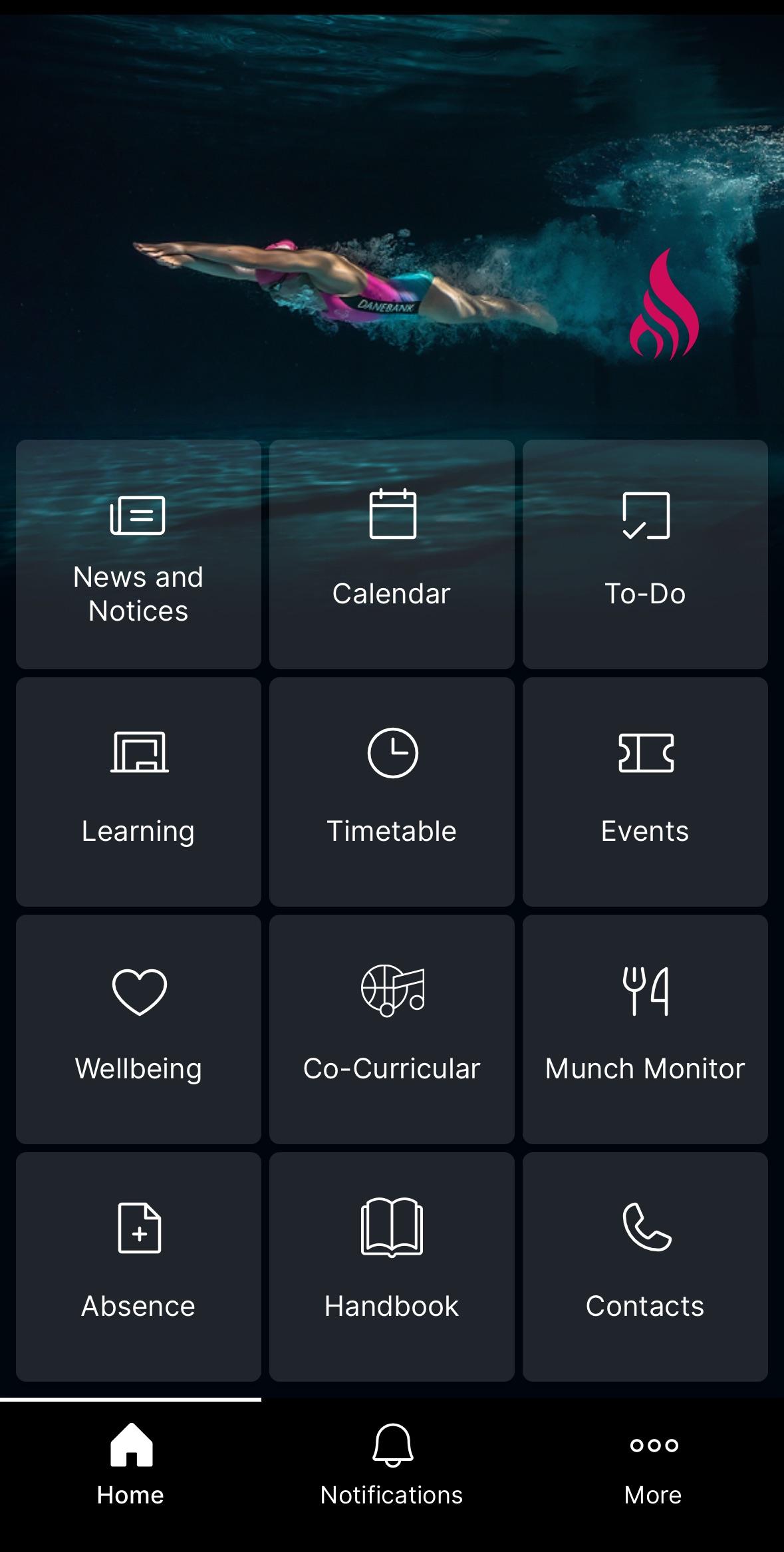
The Danebank App can be downloaded at any time, but can only be accessed once your daughter has started school at Danebank.
This App is our school’s primary tool for parents to access important school information. Once downloaded, open and sign in, using your Danebank Edumate login.
The tiles on the home screen allow for quick access to many popular areas and the ‘More’ link at the bottom right will take you through to further information and portals.
When a camp, excursion or incursion requires approval, you will receive an app notification. Simply:
To ensure you receive all communications, download the latest version of the app:
Click here to view our User Guide, or for troubleshooting, please contact our IT Helpdesk [email protected]
Keeping track of school events and appointments in the Danebank app is simple.
Any items that require parent/carer attention, such as event permissions or appointment bookings, will appear in the ‘To-Do’ section. When a new item is added, you’ll see a notification badge letting you know that a response is required.

Once you’ve submitted a permission form or confirmed an appointment, the item will then move to the ‘Events’ section. Here you can view all your upcoming school events, activities and appointments in one convenient place.
Each event includes important information such as the date, start and finish times, transport details, uniform requirements, and any other important information you may need to help you and your daughter prepare.

Online purchases
In store purchases
Shop Opening Times (during Term)
Fittings:
Shop in-store / Order online:
After the uniform fittings, you may wish to purchase uniforms at the uniform shop or order online at shop.ranier.com.au .
Purchase the uniforms now as we accept exchanges/returns up to the start of school next year. For any exchange, item must be in original condition (unworn, unwashed, unaltered, tags attached) with original packaging. Some exclusions may apply.
Note that online orders are only processed during shop operating hours. Orders placed during school/public holiday period will be picked and packed when the shop re-opens.
Ranier Uniform Booklet and Price Lists
Contact Details:
Junior School
| Question concerning ... | Contact |
|---|---|
| Class work and learning activities | The Class Teacher. Use your specific class teacher’s email address |
| A technology-related issue | [email protected] |
| Student Wellbeing (personal / social) | Junior School psychologists / counsellors, Assistant Head of Junior School Wellbeing or School Nurse |
| Chaplaincy | Junior School Chaplain: Mrs Liana Maze |
| Co-curricular Sport | Mr Cameron Morrissey |
| Co-curricular Performing Arts | Ms Emily Maguire |
| Student Academics / Learning / Support | Early Stage 1 (Kindergarten): Mrs Belinda Bartels |
| | Stage 1 (Years 1 and 2): Ms Lenyia Andrews |
| | Stage 2 (Years 3 and 4): Mrs Lena Cooper |
| | Stage 3 (Years 5 and 6): Mrs Fiona Vula |
| | Assistant Head of Junior School Learning: Mrs Deborah Uebel |
| | Head of Learning Enrichment P-6: Mrs Jaimey Thomas |
| General concerns (Junior School) | Deputy Principal Junior School, Mrs Melinda Buckley |
Senior School
| Question concerning ... | Contact |
|---|---|
| Class specific work and learning activities | Subject specific teachers or Heads of Department (refer to list below) |
| Student Academics / Learning / Support (including special provisions for examinations) | Head of Curriculum Innovation: Ms Kate Nunn |
| | Assistant Head of Senior School - Learning: Mrs Cassie Griffiths |
| | Head of Learning Enrichment 7-12: Mrs Michelle Ball |
| Student Wellbeing (personal / social) | Email your Year Coordinator |
| | Year 7 Coordinators: Ms Kathy Cordes and Ms Belinda Merrick |
| | Year 8 Coordinator: Mrs Sarah Wallekers and Ms Michelle Lui |
| | Year 9 Coordinator: Ms Karlie Cunningham and Mrs Rosaline Lynch |
| | Year 10 Coordinator: Ms Katherine Saville and Mrs Joanna Souroullas |
| | Year 11 Coordinator: Mrs Lisa Money and Mrs Kate Hoare |
| | Year 12 Coordinator: Dr Keryn Lucas and Mrs Anastasia Rompies |
| | Roseby Class: Ms Bianca Jervis |
| Chaplaincy | Senior School Chaplain: Ms Kellie Thomson |
| Co-curricular Sport | Mrs Cameron Morrissey |
| Co-curricular Performing Arts | Ms Emily Maguire |
| Outdoor Education | Mrs Alison Underwood |
| Academic / Learning (Heads of Department) | Christian Studies / SOR: Miss Kirrily Foley |
| | CAPA: Mrs Philomena Kezelos |
| | English (Acting): Mrs Ashleigh Driscoll |
| | HSIE: Ms Aneeta Hantes |
| | Languages: Ms Josephine Schreuder |
| | Mathematics: Mrs Grace Mandile |
| | PDHPE: Mr Lee Malin |
| | Science: Ms Nikki Martel |
| | TAS (Acting): Ms Karla Wootton |
| | VET: Ms Karla Wootton |
| | Roseby Class: Ms Bianca Jervis |
| Careers | Miss Helsa Niranjan |
| General concerns (Senior School) | Deputy Principal Senior School: Mrs Tiina Hufton |
| | Assistant Head of Senior School (Wellbeing): Mrs Alexandra Coulton |
| | Assistant Head of Senior School (Learning): Mrs Cassie Griffiths |
| | Assistant Head of Senior School (Operations): Mrs Anastasia Rompies |
We are excited to announce that the Junior School Parent Library is now up and running. While at this stage there are only a small number of books available, we hope to increase the range as the time progresses.
Details are as follows:
I hope that you enjoy reading the books we have available. In future newsletters, I plan on highlighting particular books from the collection.
A reminder of the process for students who have lost their green Student/Library Card (Senior School) or pink Canteen Card (Junior School).
Kiss and Ride Zones
Please remember that there are Kiss and Ride zones on Park Road as well as The Avenue, directly outside the school campus. These are used as such on Monday to Friday from 8am to 9.30am and from 2.30pm to 4.00pm. As is the case for no-parking zones, you may stop to drop off or pick up children for a maximum of two (2) minutes. You must stay inside your car, or remain within three (3) metres of it. Please do not arrive too early in the afternoons. This causes queuing in Park Road and The Avenue and you can then receive fines and demerit points.
A reminder to all parents and carers who drive their daughters to or from school: it is an offence in NSW to drive on a footpath. This brings a maximum penalty of a $423 fine and three demerit points.
Thank you for helping to keep our students and community safe.
We value and welcome our school community and appreciate the important role parents and carers play in supporting our students and staff.
Our first responsibility is keeping our students safe. To protect every child, we must ensure that all adults on site are authorised, supervised and accounted for. Therefore we need to follow consistent guidelines for when and how parents and carers may access our school site. Please review this PDF for further information.
Study Hall offers a different kind of support to students via mentor teachers who are specialists in their subject area. Students are welcome to join Study Hall on the relevant day to complete homework, ask for assistance and access assignment support and advice.
These teachers are well versed in the syllabuses and programs and can provide targeted support for students who may require specific assistance or encouragement in their learning. Students may also choose to use Study Hall to collaborate in groups on projects or homework, with the teacher available for reference if required.
We are always looking for ways to support our students in their learning and we know that sometimes learners need that assistance outside the classroom.
The After School Study Centre is one place that students can receive extra support. Danebank graduates are available to students (Years 7-12) for support and advice for 2 hours after school. We have invited these past Danebank students who have completed the HSC to share their wealth of experience and their study strategies with current students.
Student attendance at the After School Study Centre is entirely voluntary and the support offered is directly responsive to student need. Students may choose to complete some homework, ask for help with study strategies, plan for assessments, access advice about major work projects or just to talk to someone about how they are feeling at that moment.
The After School Study Centre runs on Tuesdays and Thursdays. It takes place in the Cowell Library from 3:00 - 5:00pm. The After School Study Centre is designed to run alongside and complement the teacher-led Study Halls in Mathematics, English, SOR and Science.
Duty of care in Junior School
The daily duty of care period, i.e. when a student can expect to find teacher supervision on the school premises is 8:10am - 3:45pm (Friday 3.15pm) in the Junior School. Students present at school outside of these hours are expected to attend the Extend program.
Students arriving at school before 8:10am or who are still waiting after 3:45pm Mon - Thurs or 3:15pm Friday will be taken to the Extend program and a fee will be charged.
Note: Registration with Extend is compulsory for Junior School students as it is part of our emergency care management plan.
Extend is the Before School Care and After School Care service provided to our Danebank families. Extend supports your family with flexible, easy booking options to suit different family requirements.
How and when to enrol:
Extend Guide for Families: www.extend.com.au/families/before-and-after-school-care/
Contact: 1300 366 437
Extend parent portal: extend.com.au
Bookings: https://www.extend.com.au/school/danebank-anglican-girls-school/
Policy list: